Quick answer
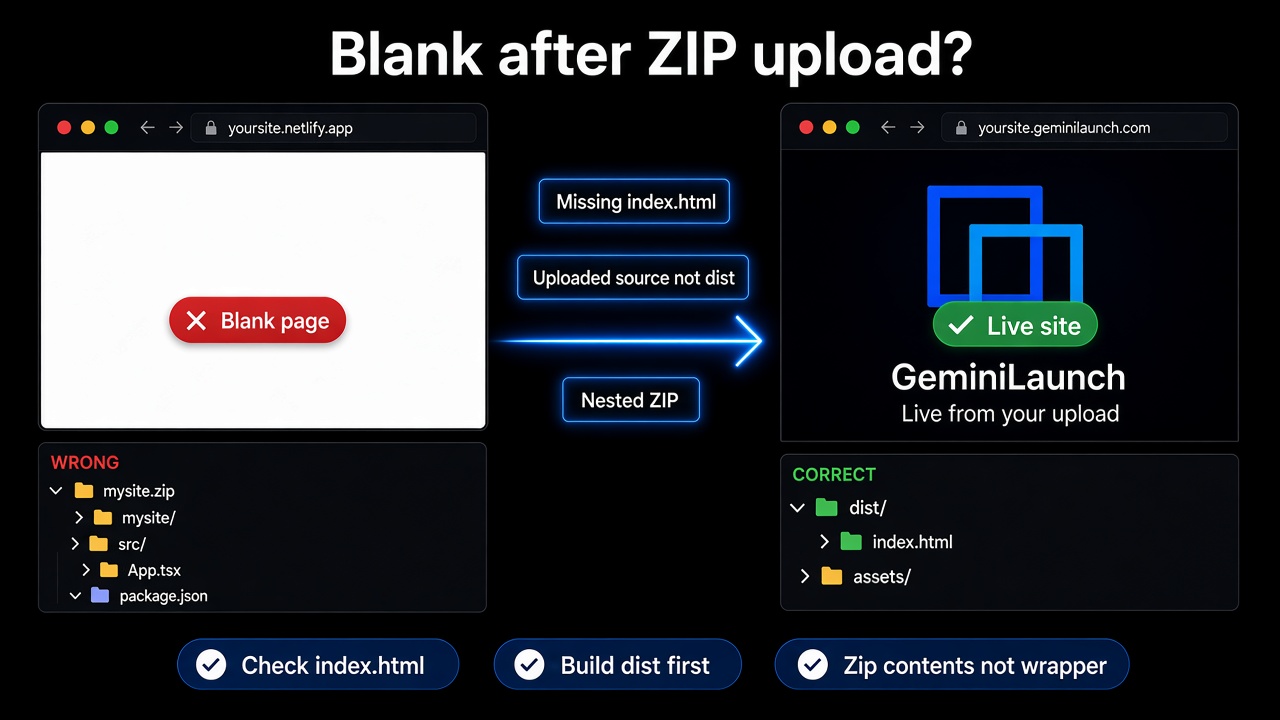
A blank website after ZIP or folder upload almost never means “hosting is broken.” It means the browser never received a usable homepage or its assets. Check, in order: index.html at the root → upload dist/build not src → no extra wrapper folder in the ZIP → DevTools Network for 404s. Then re-upload to GeminiLaunch or your Drop host.
Start here
Diagnose a blank ZIP site in two minutes
AI previews (Lovable, v0, Bolt, Cursor, ChatGPT artifacts) often hide these problems. A plain static server — including every major Drop product — does not. Use this short checklist before you rewrite the whole site.
Unzip locally: is index.html visible without opening another folder?
Do you see package.json + src/ but no dist/? Build first.
On the live URL, open DevTools → Network: any red CSS/JS files?
Console tab: any uncaught JavaScript error on load?
Root causes
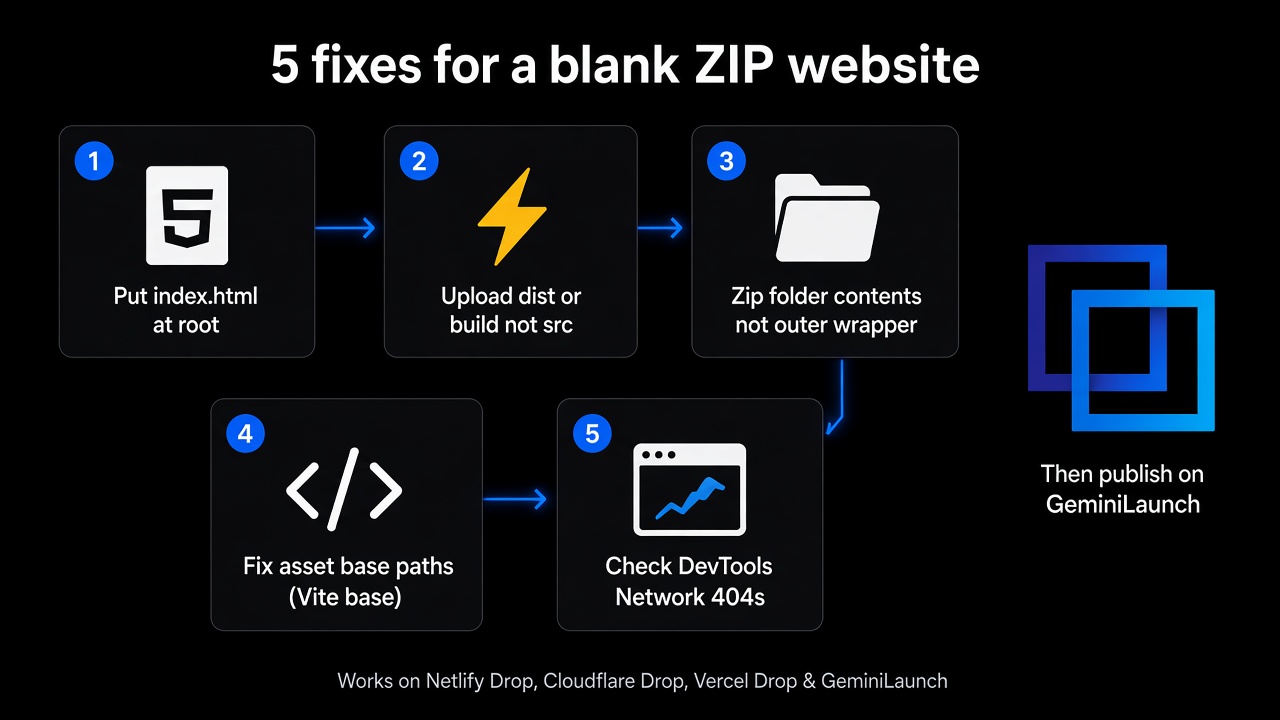
Five reasons your uploaded website is blank
These are the same failure modes reported across Netlify forums, Azure static hosting, Vite + GitHub Pages threads, and AI-export guides — not GeminiLaunch-only quirks.
Missing index.html at the site root
Symptom
404 / “Page not found”, or the host rejects the upload before it goes live.
Why it happens
Static hosts serve / by looking for index.html (sometimes index.htm) at the top of the published files. A homepage named home.html, or one buried in Pages/ or docs/, will not load at your root URL.
Fix
Put index.html at the top level of the folder or ZIP you upload — next to css/, js/, and assets/, not inside another wrapper folder. On GeminiLaunch, index.html inside public/ is also accepted and treated as the site root.
You uploaded the source project, not the build
Symptom
A white or blank browser window. DevTools may show failed JS modules or nothing useful at all.
Why it happens
Lovable, v0, Bolt, Cursor, and Vite/React exports often ship as source: package.json, src/, JSX/TSX. Browsers cannot run that tree as a website. The real site is the output of npm run build — usually dist/ (Vite) or build/ (Create React App).
Fix
On your machine run npm install && npm run build. Then upload only the contents of dist/ or build/ (or zip that folder). Do not upload node_modules or the full repo to a static Drop host.
Extra nesting: you zipped the folder, not its contents
Symptom
Root URL is blank or 404, but opening /mysite/ or /dist/ in the address bar sometimes works.
Why it happens
On Windows and macOS, compressing a folder often creates mysite.zip → mysite/ → index.html. After extract, index.html is one level too deep for hosts that only look at the archive root.
Fix
Open the build folder, select the files inside (index.html + assets), then compress those — or zip so index.html sits at the first level of the archive. GeminiLaunch strips a single root wrapper when it can, but other Drop hosts may not.
Broken asset paths (CSS/JS 404s)
Symptom
Page title may appear, but the screen stays blank or unstyled. Network tab shows 404 on /assets/*.js or absolute paths.
Why it happens
Vite and similar tools bake a base path into asset URLs. A build meant for GitHub Pages (/repo-name/) or a wrong base will request files from the wrong place on a root subdomain like yoursites.geminilaunch.com.
Fix
For root hosting, set Vite base: '/' (or './' for relative assets), rebuild, and re-upload. Open DevTools → Network, reload, and fix every red 404 before publishing again.
Client-side router or runtime errors
Symptom
Home sometimes works; refreshing /about shows 404. Or home is blank with a red Console error.
Why it happens
SPAs need the server to fall back to index.html for unknown paths. Plain static hosts may not. Separately, a missing env key or API call that only works in the AI preview can throw on a public URL and leave a white screen.
Fix
Confirm the homepage works first. Check Console for uncaught errors. For multi-page HTML sites, ship real about/index.html files. For apps that need a server or secrets, use a full framework host — static ZIP upload is not the right tool.
How-to
Repair checklist (then re-publish)
- 1
Open the live URL and note the symptom
Is it a full blank/white page, a host 404, or a reject error during upload? That single detail points to the right fix below.
Try the URL on your phone too — cache on desktop can hide a failed republish.
- 2
Inspect what you actually uploaded
Unzip your archive locally. You should see index.html immediately (or inside one folder that only wraps the site). If you only see package.json and src/, you uploaded source — build first.
If you see only assets/*.js with no index.html, you zipped the wrong subfolder.
- 3
Use DevTools on the blank page
Right-click → Inspect → Console and Network. Red 404s on JS/CSS mean path or nesting problems. Red JS exceptions mean the files loaded but the app crashed.
A successful static upload still needs working asset URLs — blank ≠ always “host is broken.”
- 4
Rebuild, re-zip the output, and publish again
After you fix structure or base paths, run a fresh build, zip the output contents, and upload again. On GeminiLaunch Pro/Scale you can replace files on the same URL.
Free GeminiLaunch uploads: keep the ZIP under 5 MB. Pro and Scale allow up to 45 MB.
When the local unzip looks right, host a website from a ZIP or folder on GeminiLaunch: drop the corrected archive, click Go Live, share the free URL. Pro raises the upload cap to 45 MB and unlocks your own domain.
Fair note
The same blank-page bugs hit every Drop host
Whether you use Netlify Drop, Cloudflare Drop, Vercel Drop, Tiiny.host, Static.app, or GeminiLaunch, a static upload only serves the files you give it. Nested archives and unbuilt React trees fail everywhere.
Netlify Drop / Cloudflare Drop — great for drag-and-drop; still need index.html at the deploy root (and a claim window on anonymous Drop).
Vercel Drop — can build frameworks when signed in; a static Drop of raw src/ still blanks.
GeminiLaunch — rejects missing index.html with a build hint, Free 5 MB / Pro 45 MB, durable .geminilaunch.com URL, paste-from-chat when you only have one file.
Comparing claim windows and commercial rules? See GeminiLaunch vs Netlify, Cloudflare & Vercel Drop.
Related guide
Host a website from a ZIP or folder
Happy-path upload, limits, and custom domain on Pro.
Read the guideRelated guide
vs Netlify, Cloudflare & Vercel Drop
Claim windows, builds, commercial use — when each wins.
Read the guideRelated guide
Deploy React without Vercel
Paste or static paths when Git + Vercel is overkill.
Read the guideFAQ
Blank ZIP website — FAQ
Direct answers for ChatGPT, Perplexity, Google AI Overviews, and classic search.
Why is my website blank after uploading a ZIP or folder?
Almost always one of five issues: no index.html at the publish root, uploading React/Vite source instead of the dist/build output, an extra nested folder inside the ZIP, broken CSS/JS paths (wrong Vite base), or a client-side error visible in the browser Console. Fix the structure, rebuild if needed, and re-upload.
Does my ZIP need an index.html?
Yes for nearly every static host, including GeminiLaunch, Netlify Drop, Cloudflare Drop, Tiiny.host, and Static.app. The homepage file must be named index.html (or sit where the host documents — GeminiLaunch also accepts public/index.html).
I uploaded a Lovable / v0 / Bolt project and got a blank page. Why?
Those tools often export a framework project, not a finished static site. Run npm install && npm run build locally, then upload the dist (or build) folder — not the full source ZIP with src/ and package.json — unless your host runs a build for you (for example signed-in Netlify Drop or Vercel Drop on a framework project).
Why does /mysite/ work but the root URL is blank?
Your index.html is nested one folder too deep. Re-zip so index.html is at the first level of the archive, or upload the inner folder that already contains the homepage.
How do I fix a blank Vite or React site after Drop deploy?
Confirm publish output is dist/ or build/ with index.html at the top. Set base to '/' for a root domain, rebuild, and check the Network tab for asset 404s. Then upload that fresh output to GeminiLaunch or your Drop host.
Can GeminiLaunch tell me when index.html is missing?
Yes. GeminiLaunch rejects uploads without a homepage and suggests running npm run build and uploading dist or build for React/Vite apps — so you get a clear error instead of a silent blank page when the archive is wrong.
Is a blank page the host’s fault?
Rarely. The same blank-page causes show up on Netlify Drop, Cloudflare Drop, Vercel Drop, Azure static hosting, and GeminiLaunch because they all serve files as uploaded. Fix the package you upload first.
When should I paste code instead of uploading a ZIP?
Paste into GeminiLaunch when the site is still one HTML or React block in ChatGPT, Claude, or Gemini. Upload a ZIP or folder when you already have multiple files, images, fonts, or a built dist on disk.
How do I host a fixed ZIP website for free after I solve the blank page?
Upload the corrected folder or ZIP in GeminiLaunch (Free up to 5 MB per site), publish a free .geminilaunch.com URL, then connect yourbrand.com on Pro ($15/mo) when you are ready. No GitHub required.
Like this guide? Make GeminiLaunch a preferred source.
Get our hosting and deployment guides surfaced first in your Google results, AI Overviews, and Top Stories.
Fixed the blank page? Put it on a live URL
Drop the corrected ZIP or folder into GeminiLaunch, publish free, then connect your domain on Pro when you are ready. Clear homepage checks beat silent white screens.